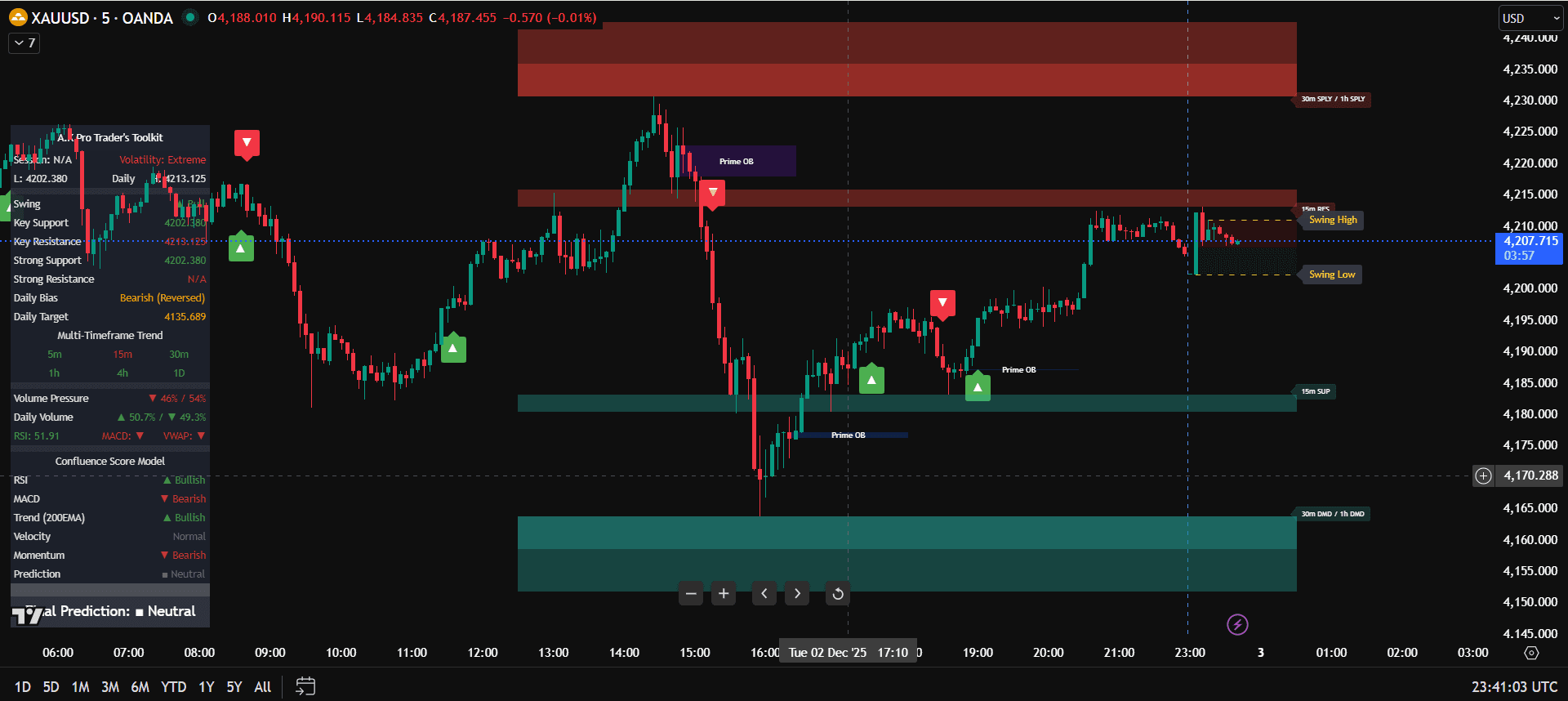
Step-by-step Guide: Activating A.K Pro Traders Indicators
This guide walks you through how to activate your invite-only TradingView scripts and start using A.K Pro Trader's indicators – with a special focus on the A.K Pro Trader's Toolkit. Once you complete these steps, the same process can be repeated for Smart Money Concepts (SMC) and Multi-Timeframe Key Levels.
Step 1 – Complete your subscription
- Go to the Pricing page and choose either Single Indicator or All Indicators Access.
- Complete checkout in USD using the secure payment form (Stripe).
- During checkout, make sure you correctly enter your TradingView username. This is how access is granted.
- Once payment clears, your TradingView username is added to the invite-only list for the indicators you subscribed to.
Step 2 – Add the invite-only scripts on TradingView
- Open TradingView and log in with the same username you provided.
- On the left sidebar, go to Indicators > Invite-only scripts.
- You'll see entries such as:
- A.K Pro Trader's Toolkit
- A.K Pro Trader's Smart Money Concepts
- A.K Pro Trader's Multi-Timeframe Key Technical Levels
- Click once on the indicator name to add it to your chart.
Step 3 – Configure the Toolkit on your chart
- Open the settings (gear icon) on the indicator to choose which confluence tools you want to show.
- Start with a clean layout – keep a few high-value tools enabled and hide the rest until you need them.
- Use the Toolkit on one main execution timeframe (for example M5 or M15) and confirm with higher timeframes (H1, H4, D1).
Tip: give yourself time to learn each feature. The Toolkit is designed as a professional framework – not a simple "buy now" signal tool.
Step 4 – Build a full confluence-based plan
The Toolkit is built around structured, top-down analysis. A strong trade idea should line up multiple pieces of information, not just one arrow or label.
- Start from the higher timeframe to identify trend and key zones where institutional order flow is likely to react.
- Mark key areas where you expect premium vs discount pricing, liquidity pools and previous turning points.
- Drop down to your intraday timeframe to look for structure shifts, liquidity grabs and clean setups inside those higher-timeframe zones.
- Only consider trades where direction, location and confirmation from the Toolkit all line up.
Step 5 – Risk management & journaling
- Keep your risk per trade consistent and reasonable relative to your account size – small but repeatable.
- Place stops beyond obvious equal highs/lows and liquidity – don't park stops exactly where stop hunts are common.
- Journal trades with screenshots of the Toolkit layout – including HTF context, entry, stop, target and notes.
- Review your journal weekly to see which confluence factors lead to your best trades and which conditions to avoid.
Once you are comfortable with the Toolkit process, repeat the same activation and configuration steps for the Smart Money Concepts and Multi-Timeframe Key Levels indicators. All three are designed to work together inside one structured trading plan.
Indicator Review – A.K Pro Trader's Toolkit
The A.K Pro Trader's Toolkit is built for traders who want structure, confluence and clarity without turning their chart into a mess of indicators. Instead of running five or six separate tools, you can keep one organised overlay that brings all the important pieces together.
Who the Toolkit suits best
- Intraday and swing traders on Gold (XAUUSD), indices and FX.
- Traders who already understand basic price action but struggle with consistency and over-trading.
- Those who prefer a rule-based, professional framework rather than pure intuition or "buy/sell" arrows.
Main strengths
- Keeps you focused on high-quality areas instead of chasing random entries in the middle of nowhere.
- Encourages top-down thinking – higher timeframe first, then refine on intraday charts.
- Built specifically with Gold and fast-moving markets in mind where liquidity grabs are common.
- Flexible layout – you can keep it minimal or build a full institutional-style map.
Things the Toolkit will not do
- It will not remove the need for your own trade management, psychology and risk control.
- It will not guarantee profits or remove losing trades – losses are part of trading.
Disclaimer
These guides and A.K Pro Traders indicators are provided for educational and informational purposes only. They do not constitute financial advice or a solicitation to trade. Trading involves substantial risk – you may lose some, all, or more than your initial investment. Past performance is not indicative of future results. You are solely responsible for your trading decisions. Always practice sound risk management, perform your own research, and consider speaking with a licensed financial advisor before making investment or trading decisions.